
- Home
-
FRED Software
-
Training
-
Engineering
-
News
-
Company
-
Contact us
FRED, now AI-ready
Introducing the FRED MCP Server and FRED Python Library. Drive FRED from an AI assistant in plain English, or from your own Python code.

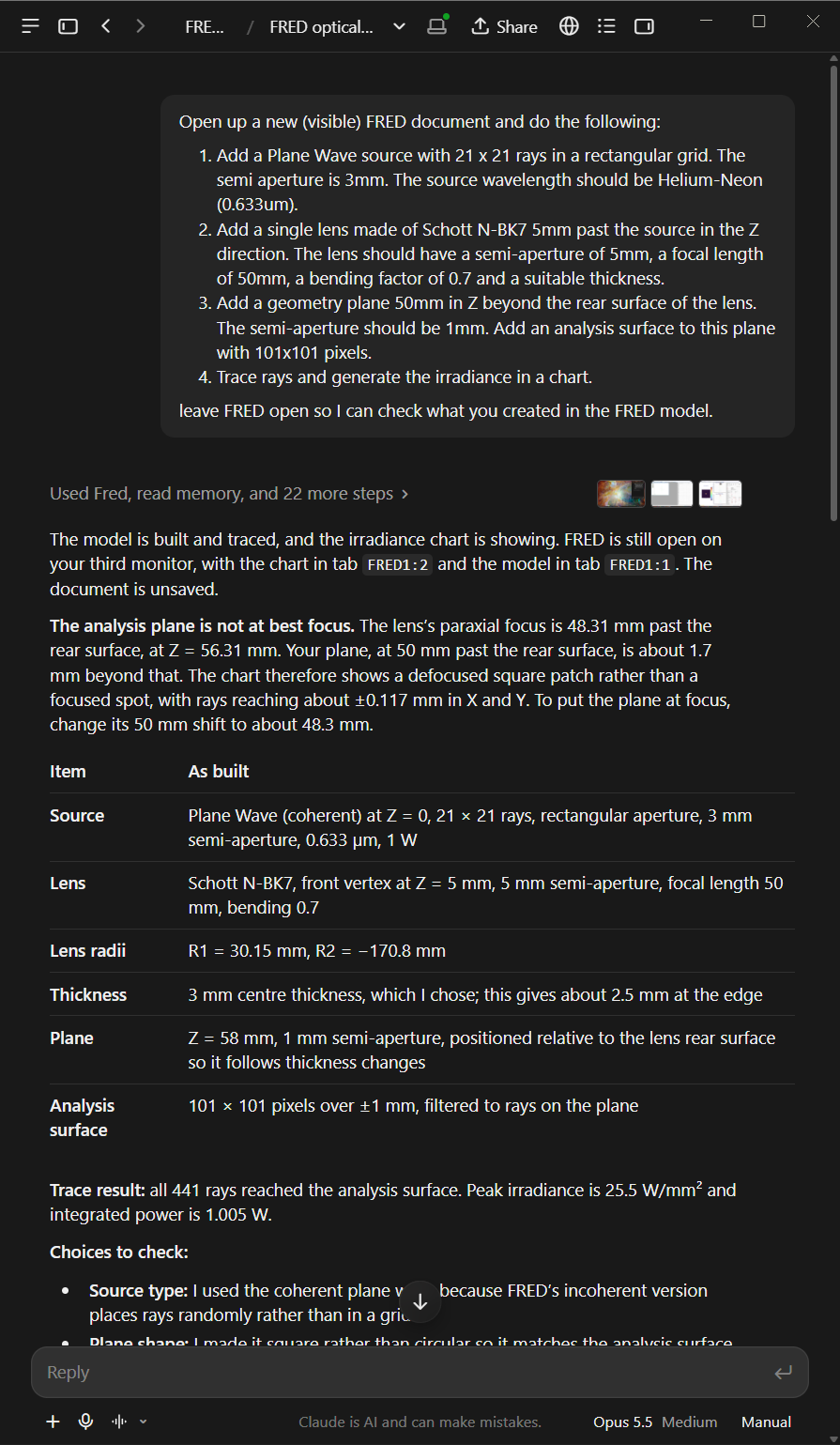
Talk to FRED
The FRED MCP Server connects FRED to AI assistants through the Model Context Protocol (MCP), an open standard. Describe what you need in plain language, and the assistant carries out the steps in your local FRED installation.
What it can do:
Create, open and save models: start new models, load existing .frd files and save your work
Inspect your system: ask about a model's geometry, sources and analysis setup and get clear answers
Run ray traces: start traces and analyses straight from the conversation
Write and run FRED scripts: the assistant drafts scripts, checks them for errors, then runs them
Search FRED's documentation: the assistant looks up commands and syntax in the official FRED docs, so its answers are based on the real COM API and scripting language documentation instead of guesses
In the example (left) Claude is asked to set up a simple lens system in plain English.
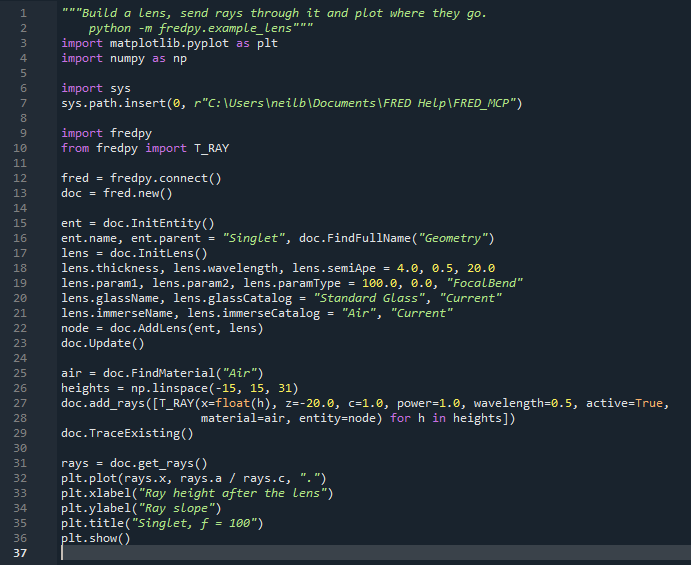
FRED, the Pythonic way
The FRED Python Library lets you control FRED from Python. You can script model builds, automate parameter sweeps and send results straight into NumPy, pandas or Matplotlib. Use it to plug FRED into test pipelines, optimization loops and custom tools, with no need to switch languages.
Build and change FRED models from Python scripts
Run ray traces and analyses in batches
Extract results for analysis and plotting
Conversation to code
Prototype an analysis in conversation through the MCP Server, then turn it into a repeatable Python workflow with the library. You explore quickly and keep the result as code you can run again.
Built fast, released early: these tools are experimental
The FRED MCP Server and Python Library were "vibe coded": we built them quickly with AI-assisted development to get new capabilities to you sooner. That makes them experimental. They aren't part of FRED's core release, they may change without notice, and they aren't covered by standard technical support.
Always check results against FRED's native interface before you rely on them for design decisions. We'd love your feedback. Early users will help decide what these tools become.
Try it and tell us what you think
Both tools are available now to FRED users who want to explore what's next. Download below, try them on your own models and help us shape the future of FRED. Send your feedback to fredsupport@photonengr.com.
Note that the ZIP folder contains both the MCP Server and the FRED Python library (fredpy) in addition to getting started guides.


Recent Posts
-
 FRED Version 25.50 Released05 Jun 2026
-
 FRED Classes now offered in Europe14 Aug 2025
-
 Photon Engineering Expands Presence into Europe02 Jun 2025
Contact info
-
Photon Engineering LLC, 310 S Williams Blvd, #222, Tucson, AZ, 85711
-
Tel: +1-520-733-9557
-