To download the latest development version of FRED, 25.50.0, please select the option below. Note that ALL licenses are eligible to run the 64-bit version of FRED. An email will be automatically sent to you with the download information. If for some reason, you do not find the email in your inbox, please check your spam filter or bulk email folder.
Photon Engineering makes developmental test versions of the FRED Optical Engineering Software available to users on an occasional basis. Users under a current annual support contract can have early access to the newest features and the latest bug fixes. In return, we ask for your feedback regarding the new feature implementations and any potential bugs.
As with any software product under development, please be aware of the following:
It is important to consider the issue of FRED file version compatibility. FRED model files are fully backward compatible, but they are not forward compatible. For example, FRED files created with earlier versions can be read by FRED version 25.50.0, but files created by version 25.50.0 can not be read by prior releases.
This development version release falls under Photon Engineering’s FRED End User License Agreement section 4,” Limited Warranty”.
Before downloading you should verify that your current software authorization codes will allow you to run the development version. To do this, launch your current version of FRED and go to Menu > Help > License Authorization. If the version limit reported in the License Authorization dialog matches or exceeds the development version number you want to download, then you will be able to run the development version.
Note: You may observe that after downloading and running the FRED installer, Windows presents the following dialog. If you see this warning:
If your version shows an option to display “More info”, please click on that link. You will then be presented with an option to run the installer file.
If your version of this dialog does not show an option to display “More info”, please take the following steps:
Right mouse click on the FRED installation executable and choose “Properties”.
On the General tab of the resulting dialog, look for an option in the lower right that says “Unblock”. Toggle this option.
Close the properties dialog and then run the FRED installer executable again.
Release Notes are included with your FRED installation and can be found by navigating to Help > Release Notes from the menu.
The following new items and bug fixes are included in this developmental release version:
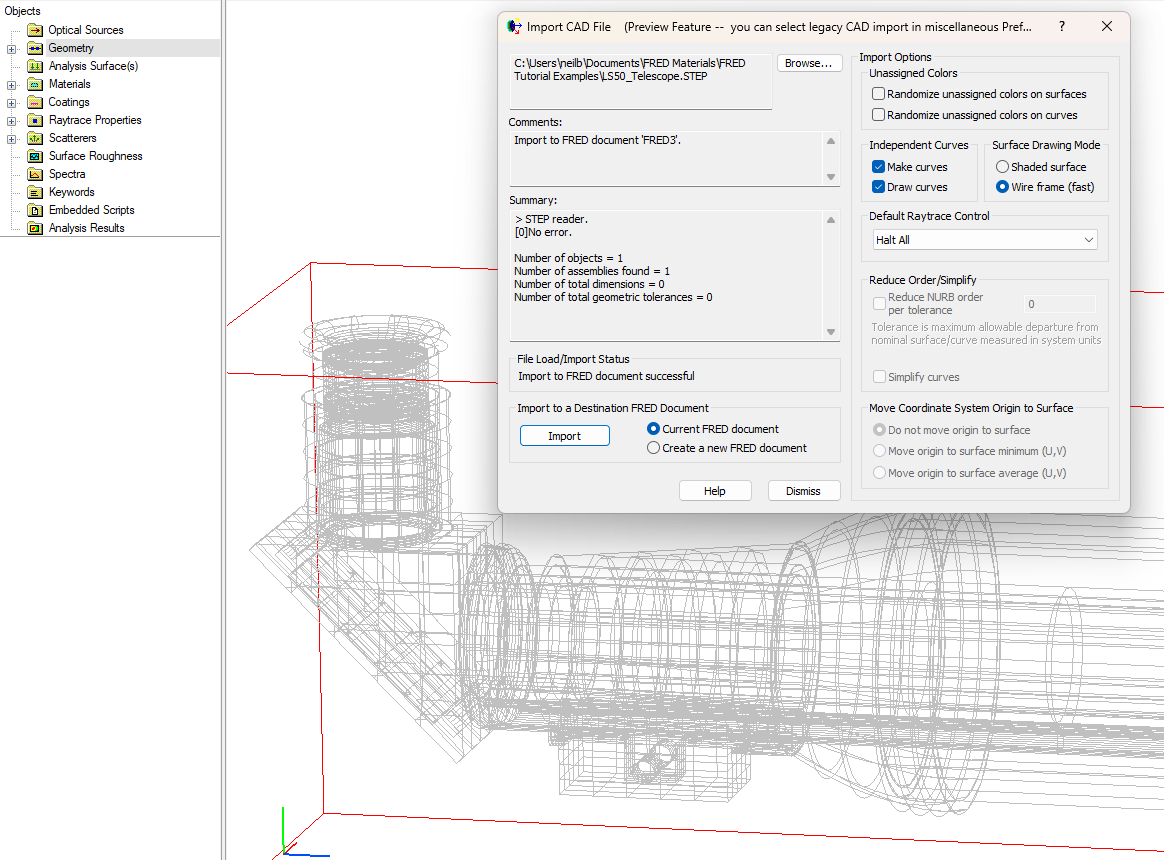
Newer CAD libraries have been added to FRED to facilitate CAD import.
Notable usability enhancements include:
Support for importing native CAD file formats such as SolidWorks, Catia, Creo (Pro/E), Autodesk Inventor, Parasolid and more… (FRED Optimum and MPC only)
CAD surfaces are imported as FRED native surfaces wherever possible. Using native surfaces results in faster ray tracing, and also provides a local reference on the native surface to reference other objects to. Any surfaces that cannot be represented by a native surface will continue to be imported as a NURBS surface.
Supports the import of complex CAD geometry that may fail in the legacy importer.
Note that it is possible to revert to the legacy CAD import at any time by selecting the “Use Legacy CAD Import” option in Tools... Preferences... Miscellaneous. Also note that you do not need to restart FRED for this change to take effect. CAD Export is currently unaffected by this change and will be addressed at a later date.
Preview features are an early look at new functionality being added to FRED and are shared ahead of completion for the following reasons:
To solicit feedback from users on a feature whilst it is being developed
To help test a larger change over a longer amount of time in a wider array of use cases
Preview features are, by definition, unfinished. We know we still have work to do but we release them in preview form because we believe that they are useful even in their unfinished state.
Please share your feedback on these features via fredsupport@photonengr.com.
Sub-assemblies have been updated to make it easier to manage models with more complex source set-ups containing multiple objects. Sub-assemblies:
are now permitted inside the Optical Sources Folder
may contain geometry and/or optical sources.
This change makes it easier to group sources together into folders which can be toggled on/off as a group. It also allows sources to exist outside the sources folder (e.g. within a sub-assembly in the geometry folder), and allows geometry to exist within a sub-assembly within the source folder (e.g. a CAD model of the source defined alongside the source model in the sub-assembly).
Volume scatter has been updated in the following ways:
Volume Scatter is now supported in FREDmpc
A calculation has been added to find the Mean Free Path from the total particle volume density, and average particle scatter cross section
Added support for direct user entry of a volume scatter ray/particle transmission factor.
Specifically for Mie scatter:
the simple particle binning into the Mie intensity function has been replaced with a quadratic fit through 3 nearest points when interpolating the Mie scatter function. This eliminates the unphysical "steps" observed in the Mie BSDF function at small scatter angles.
Updated the Mie volume scatter model with a simple power absorption algorithm that is applied to the ray during Mie scatter events, where the absorption is the result of a non-zero imaginary value of the particle refractive indices.
Added support for Biaxial Birefringent media
Added the ability to display material Birefringent/GRIN orientation axes in the 3D View for Sources, Elements, and Surfaces.
Added ability to copy tree elements via a new script command, CopyEntity
Updated support for the Zernike surface. It has been supplemented with an x,y offset for the Zernike polynomial, and Zernike conic base surface offset and tilt. These are similar to the equivalent support of Zernike surfaces by CodeV and Zemax.
Added a new Cubic Hermite polynomial 3D curve type.
Implemented a new greatly improved algorithm for predicting the polarization behavior of the Jones Matrix coating type away from normal incidence. In addition, support for reflection has been implemented for the local "Y" polarization component of the linear polarizer Jones Matrix type.
Two new menu items in the "Tools" main menu now allow the user to manually save and read FRED preference settings to or from a file or the registry.
In addition to the improvements described above, this release contains several smaller features and bug fixes. Please refer to the Release Notes found on the Help menu inside of FRED for a complete listing of all enhancements and defect resolutions.